When you sign up for a service with a disposable email, you often need the verification code forwarded to your real inbox, or you want to automatically discard marketing emails while keeping transactional ones. Inbox Rules let you set up these automations once and forget about them.
Available on Pro and Business plans, inbox rules process every incoming email against your defined patterns and trigger actions before the message is even stored. Pro accounts get 10 rules; Business accounts get 50.
How Inbox Rules Work
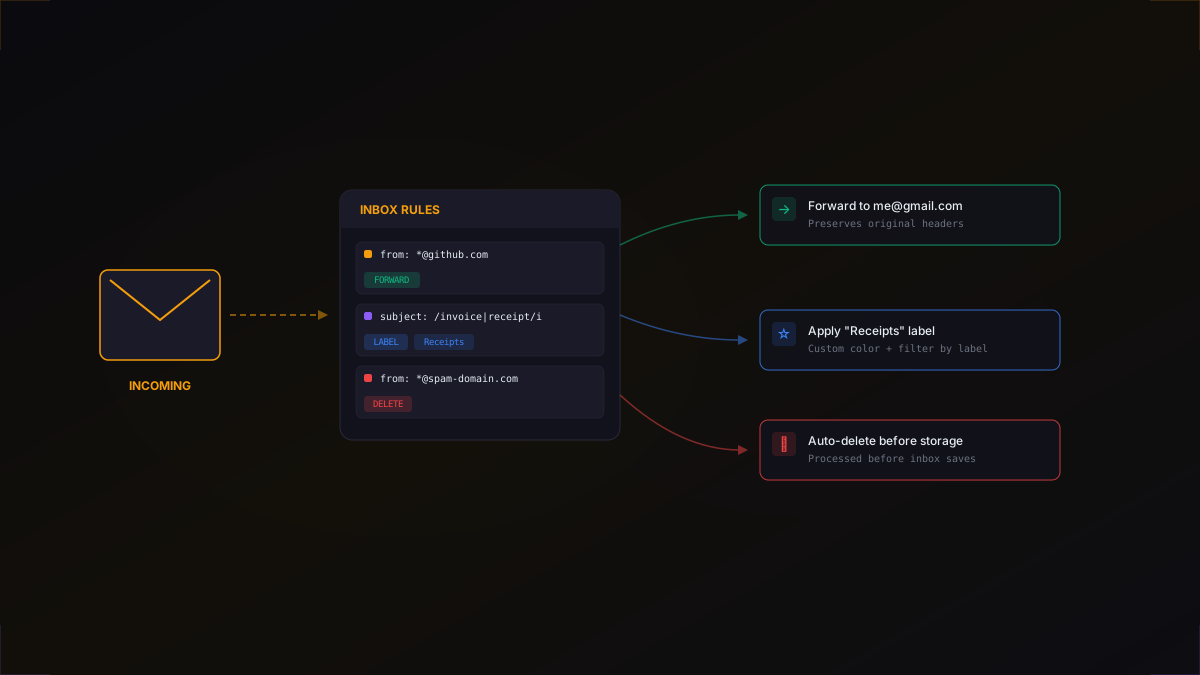
When an email arrives at your inbox, the system evaluates it against your rules in priority order (lowest number first). The first matching rule executes its action. If no rules match, the email is stored normally.
Each rule can match on two fields:
- Sender pattern - regex match against the sender's email address (e.g.,
.*@github\.com) - Subject pattern - regex match against the email subject line (e.g.,
(invoice|receipt))
You can use one or both patterns. If both are specified, the email must match both for the rule to trigger.
Three Rule Actions
Forward
Route matching emails to an external email address. This is useful when you want verification codes or important notifications sent directly to your personal inbox while keeping the disposable address as the public-facing one.
Forwarded emails preserve original headers so your personal email client can properly display the sender, subject, and threading.
Label
Apply a custom label to matching emails. Labels are color-coded tags you create and assign via rules. They make it easy to filter and organize messages when an inbox receives emails from multiple sources.
Pro accounts can create up to 10 labels; Business accounts get 50.
Delete
Discard matching emails before they're stored. The email is processed and evaluated, but never saved to your inbox. Use this for known spam domains or marketing emails you don't want cluttering your inbox.
Creating Rules with the SDK
1import { DestroyNetwork } from "@destroy-network/sdk";2 3const dn = new DestroyNetwork({ apiKey: process.env.DESTROY_API_KEY });4 5// Forward all GitHub emails to your personal inbox6await dn.inboxRules.create({7 name: "Forward GitHub emails",8 senderPattern: ".*@github\.com",9 action: "forward",10 forwardTo: "me@gmail.com",11 priority: 1,12});13 14// Auto-delete emails from known spam domains15await dn.inboxRules.create({16 name: "Block spam",17 senderPattern: ".*@(spam-domain|junk-mail)\.com",18 action: "delete",19 priority: 2,20});21 22// Label all receipts for easy filtering23await dn.inboxRules.create({24 name: "Tag receipts",25 subjectPattern: "(invoice|receipt|payment|order confirmation)",26 action: "label",27 labelId: "lbl_receipts",28 priority: 3,29});Rules are evaluated in priority order. Set lower numbers for rules you want checked first. The first match wins - subsequent rules are skipped for that message.
Custom Labels
1// Create custom labels with colors2const label = await dn.labels.create({3 name: "Receipts",4 color: "#10b981", // emerald5});6 7// Labels are automatically applied by rules8// You can also filter messages by label9const receipts = await dn.messages.list(inbox.id, {10 labelId: label.id,11});Labels support hex color codes so you can visually distinguish categories at a glance. Once a label rule is in place, every matching email is tagged automatically.
Inbox-Level Email Forwarding
Besides rule-based forwarding, you can enable forwarding at the inbox level. When turned on, every email received at that inbox is automatically forwarded to your specified address.
1// Enable email forwarding on an inbox2const inbox = await dn.inboxes.create({3 name: "forwarded-inbox",4 domain: "destroy.email",5});6 7// Any email received is forwarded to your real address8await dn.inboxes.update(inbox.id, {9 forwardTo: "me@gmail.com",10});11 12// Rules override inbox-level forwarding13// If a rule matches, its action runs insteadIf a rule matches an incoming email, the rule's action takes precedence over inbox-level forwarding. This lets you set up a catch-all forward while still deleting or labeling specific messages.
Inbox Templates
If you find yourself creating inboxes with the same forwarding, webhook, and domain settings every time, save them as a template. Free accounts can save 3 templates, Pro gets 10, and Business gets 25.
1// Save common inbox configurations as templates2await dn.inboxTemplates.create({3 name: "QA Testing Template",4 domain: "destroy.email",5 forwardTo: "qa-team@company.com",6 webhookUrl: "https://hooks.slack.com/services/T.../B.../xxx",7 isDefault: true, // used when creating inboxes without options8});9 10// Create an inbox from the template11const inbox = await dn.inboxes.create({12 templateId: "tpl_abc123",13});14// Inbox inherits all template settingsSet a template as default and every new inbox you create will inherit those settings automatically.
cURL Example
Rules are managed through the standard REST API, so you can configure them from any language or tool:
1# Create a forwarding rule via cURL2curl -X POST https://destroy.network/api/rules \3 -H "Authorization: Bearer sk_live_your_key" \4 -H "Content-Type: application/json" \5 -d '{6 "name": "Forward GitHub",7 "senderPattern": ".*@github\\.com",8 "action": "forward",9 "forwardTo": "me@gmail.com",10 "priority": 111 }'Real-World Use Cases
- Forward verification codes - sign up to services with a disposable address but get the codes sent to your real inbox
- Filter by sender - keep transactional emails from Stripe or GitHub, delete everything else
- Organize test emails - label emails by service when running QA tests against multiple providers
- Block spam domains - auto-delete emails from known spam senders so they never reach your inbox
- Webhook + forward combo - forward the email to your team while also triggering a Slack notification via webhook
Plan Limits
- Free - no inbox rules, no labels, no email forwarding
- Pro ($5/mo) - 10 rules, 10 labels, email forwarding
- Business ($15/mo) - 50 rules, 50 labels, email forwarding, priority support
Get Started
Inbox rules are available now on Pro and Business plans. Upgrade your plan to start automating your disposable inboxes, or read the API documentation for the full rules endpoint reference.