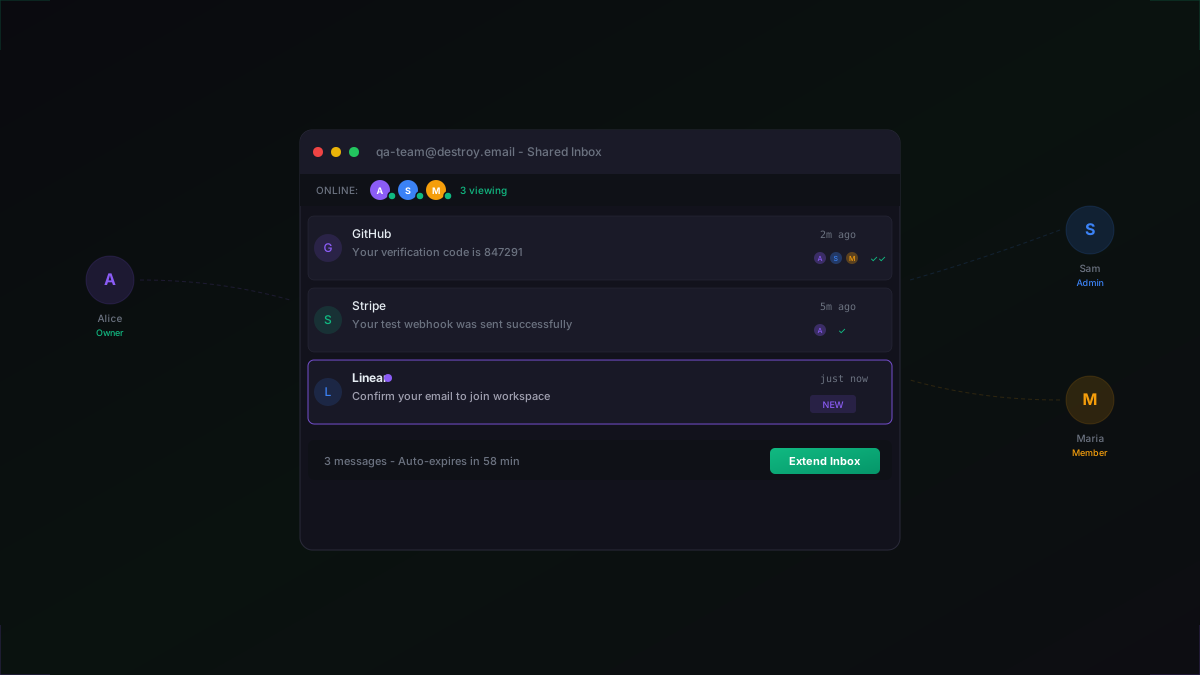
QA testing with email is painful when everyone on the team uses separate inboxes. Someone signs up, waits for the verification code, copies it into Slack, and the rest of the team has no idea what happened. With shared inboxes, every team member sees the same emails in real-time - no copying, no screenshots, no missed messages.
Team Shared Inboxes are available on Business plans. They use WebSocket connections through Cloudflare Durable Objects for instant delivery, live presence, and message-level read receipts.
Creating a Team
Start by creating a team workspace and inviting your colleagues. Business accounts can create up to 5 teams with 25 members each.
1import { DestroyNetwork } from "@destroy-network/sdk";2 3const dn = new DestroyNetwork({ apiKey: process.env.DESTROY_API_KEY });4 5// Create a QA team workspace6const team = await dn.teams.create({7 name: "QA Team",8});9 10// Invite team members by email11await dn.teams.invite(team.id, {12 email: "alice@company.com",13 role: "admin", // can manage members and inboxes14});15 16await dn.teams.invite(team.id, {17 email: "sam@company.com",18 role: "member", // can view shared inboxes19});Team members are invited by email. They'll receive an invitation and join the workspace once they accept. Three roles control what each member can do:
1// Team roles and their permissions2//3// Owner - full control: manage team, members, inboxes, billing4// Admin - manage members and shared inboxes5// Member - view shared inboxes and messages (read-only)6//7// Business plan supports:8// - Up to 5 teams per account9// - Up to 25 members per team10// - Shared inboxes with real-time collaboration11// - Live presence indicators12// - Read receipts per messageSharing Inboxes
Any inbox you create can be shared with one or more teams. Once shared, all team members can see the inbox and its messages in real-time.
1// Create an inbox and share it with the team2const inbox = await dn.inboxes.create({3 name: "qa-signup-test",4 domain: "destroy.email",5});6 7// Share the inbox with your team8await dn.inboxes.share(inbox.id, {9 teamId: team.id,10});11 12// All team members can now see this inbox13// and receive real-time updates via WebSocketShared inboxes behave exactly like personal ones - emails are delivered, stored, and expire on the same schedule. The difference is that everyone on the team sees them simultaneously.
Live Presence and Read Receipts
When a team member opens a shared inbox, a WebSocket connection is established through Cloudflare Durable Objects. This connection powers three real-time features:
- Presence indicators - see who's currently viewing the inbox with online/away status
- Real-time message delivery - new emails appear instantly for all connected team members
- Read receipts - track which team members have read each message, with timestamps
1// Team members get live presence indicators2// The WebSocket connection shows who's viewing the inbox3 4// When Alice opens the shared inbox:5// { "type": "presence", "users": [6// { "name": "Alice", "role": "admin", "status": "online" },7// { "name": "Sam", "role": "member", "status": "online" }8// ]}9 10// Read receipts track who has seen each message:11// { "type": "read_receipt",12// "messageId": "msg_abc123",13// "readBy": ["Alice", "Sam"],14// "readAt": "2026-02-27T10:15:00Z"15// }Read receipt history is retained for 7 days before automatic cleanup. This gives your team enough time to review test results without accumulating stale data.
CI/CD Integration with Playwright
The real power of shared inboxes is in automated testing. Your CI pipeline creates a shared inbox for each test run, and the QA team can watch the test execute in real-time from the destroy.networkdashboard.
1// CI/CD integration - each test run gets its own shared inbox2import { test, expect } from "@playwright/test";3import { DestroyNetwork } from "@destroy-network/sdk";4 5const dn = new DestroyNetwork({ apiKey: process.env.DESTROY_API_KEY });6 7test("team signup flow", async ({ page }) => {8 // Create a shared inbox for this test run9 const inbox = await dn.inboxes.create({10 name: `ci-${Date.now()}`,11 domain: "destroy.email",12 });13 14 // Share with the QA team so they can watch live15 await dn.inboxes.share(inbox.id, {16 teamId: "team_qa",17 });18 19 // Run the signup flow20 await page.goto("/signup");21 await page.fill("[name=email]", inbox.address);22 await page.fill("[name=password]", "TestP@ss123!");23 await page.click("button[type=submit]");24 25 // Wait for the verification email26 const messages = await dn.messages.list(inbox.id);27 // Team members can see this email arrive in real-time28 29 expect(messages.length).toBeGreaterThan(0);30 expect(messages[0].subject).toContain("Verify");31});Because each test run creates its own inbox, there's zero state leakage between runs. The team can observe the current run while previous inboxes expire automatically.
Why Not Just Use a Shared Gmail?
Teams often start with a shared Gmail or Outlook account for QA testing. Here's why that breaks down:
- State pollution - old test emails accumulate and it's impossible to tell which run a message belongs to
- Password sharing - everyone needs the same credentials, which is a security risk and triggers 2FA challenges
- No isolation - two test runs sending to the same address will see each other's emails
- No API access - you can't programmatically create or read from a shared Gmail account in CI
- Rate limits - Google flags accounts that receive high volumes of verification emails
Shared disposable inboxes solve all of these. Each test gets a fresh, isolated inbox that the team can monitor in real-time, and it cleans itself up when the test is done.
Team Use Cases
- QA sprint testing - the team shares a single inbox while testing a signup flow, everyone sees the same emails
- Customer support debugging - reproduce a customer's email issue in a shared inbox so the entire support team can investigate
- Onboarding review - product managers watch the actual email a new user receives during signup, in real-time
- CI monitoring - share CI test inboxes so the team can watch automated tests execute live
- Multi-service testing - create multiple shared inboxes for different services (Stripe, GitHub, Auth0) and assign each to the relevant team
Plan Details
Team workspaces and shared inboxes are exclusive to the Business plan:
- Up to 5 teams per account
- Up to 25 members per team
- 50 concurrent inboxes with 60-minute lifetime
- Real-time delivery via SSE and WebSocket
- Live presence and read receipts
- Priority support for your team
- $15/month or $144/year (20% discount)
Get Started
Upgrade to Business to create your first team workspace. Invite your QA team, create a shared inbox, and see how real-time collaboration changes your testing workflow. Need help getting set up? Contact us or open a support ticket from your dashboard.