Every time you sign up for a service, download a free trial, or enter an email address online, you're opening the door to spam, marketing emails, and potential data breaches. A disposable email address (also called temporary email or temp mail) solves this problem by giving you a throwaway email that self-destructs after you're done with it.
This guide explains everything you need to know about disposable email addresses in 2026, from how they work to when to use them.
What Is a Disposable Email Address?
A disposable email address is a temporary email inbox that:
- Receives emails just like a regular email address
- Requires no signup or registration
- Automatically expires after a set time period
- Protects your real email address from spam and tracking
Unlike permanent email services (Gmail, Outlook, ProtonMail), disposable email addresses are designed to be used once and discarded. They're perfect for situations where you need to receive an email but don't want the sender to have your real contact information.
How Does Temp Mail Work?
Temporary email services like destroy.network work by creating instant, throwaway inboxes on demand. Here's the typical flow:
1. Instant Inbox Creation
You visit a temp mail service and get an email address immediately-no password, no phone number, no personal information required. Modern services like destroy.network create inboxes in under 100 milliseconds using edge computing on Cloudflare's global network.
2. Receive Emails in Real-Time
When someone sends an email to your temporary address, it arrives instantly. Advanced services use Server-Sent Events (SSE) to deliver emails in real-time without you having to refresh the page-the same technology streaming services use for live updates.
3. Automatic Expiration
After a set time period, the inbox and all its emails are permanently deleted. On destroy.network, free inboxes last 10 minutes (with a one-time 10-minute extension), while paid plans offer longer durations with unlimited extensions. This ensures your data doesn't sit around indefinitely where it could be exposed in a breach.
Why Use Disposable Email Addresses?
Temporary email addresses solve several common problems in online privacy and inbox management:
1. Stop Spam Before It Starts
The average person receives 121 emails per day, with nearly half being promotional or spam. When you use a disposable email for signups, that spam never reaches your real inbox. Once the temp email expires, the spam stops forever.
2. Protect Your Privacy
Your email address is a valuable data point for advertisers and data brokers. When you share it, companies can:
- Track your online behavior across websites
- Sell your email to third-party marketers
- Build detailed profiles about your interests and purchases
- Link your email to your real identity through data brokers
A disposable email address breaks this tracking chain. Services can't build long-term profiles when the email address disappears after a few hours.
3. Test Services Without Commitment
Free trials often require an email address even if you're just testing the service. Disposable email lets you:
- Sign up for trials without giving your real email
- Avoid recurring subscription reminders
- Test multiple services without cluttering your inbox
- Prevent services from tracking you after the trial ends
4. Receive One-Time Verification Codes
Many websites require email verification to complete registration. If you only need to verify once and never want to hear from them again, a temporary email is perfect. Get your verification code, complete the signup, and let the inbox expire.
5. Minimize Data Breach Exposure
Over 6 billion email addresses have been exposed in data breaches in the last decade. When you use a disposable email that auto-deletes, there's nothing to steal. Even if the service you signed up for gets breached, your temporary email no longer exists.
When Should You Use a Disposable Email?
Temporary email addresses are perfect for dozens of everyday scenarios:
Ideal Use Cases
- Free trials and demos: Netflix, Spotify, SaaS tools-anything asking for an email before a trial
- One-time downloads: Whitepapers, ebooks, software trials, and gated content
- Online shopping: Retailers you'll never buy from again or who send excessive marketing emails
- Forum registrations: Reddit alternatives, niche communities, or forums you're just browsing
- Newsletter signups: When you want one article but don't want weekly emails forever
- Testing websites or apps: Developers and QA teams use disposable email to test signup flows without creating dozens of permanent accounts
- Public WiFi signups: Hotels, airports, and cafes that require an email before granting access
- Contest entries: Sweepstakes and giveaways where you expect marketing spam afterward
When NOT to Use Disposable Email
Temporary email isn't appropriate for everything. Avoid using it for:
- Banking and financial services (they often block temp mail domains)
- Work or school accounts where you need long-term access
- Important accounts you'll use regularly (social media, cloud storage)
- Any service where you need to recover your password later
- Legal documents or contracts requiring verified identity
How DESTROY.NETWORK Makes Disposable Email Better
Not all temporary email services are created equal. Here's what sets modern privacy-first services like destroy.network apart:
Zero Registration Required
Most people use disposable email specifically to avoid creating accounts.destroy.network respects that-you get an inbox instantly without providing any personal information. No email, no password, no phone number.
Real-Time Email Delivery
Older temp mail services make you refresh the page to check for new emails. destroy.network uses Server-Sent Events (SSE) to push emails to your browser the instant they arrive. It's the same technology Netflix uses for live updates.
Flexible Auto-Expiring Inboxes
Different use cases need different lifespans. destroy.network offers:
- Free: 10-minute inboxes with one 10-minute extension
- Pro ($5/mo): 30-minute inboxes with unlimited 30-minute extensions
- Business ($15/mo): 60-minute inboxes with unlimited extensions, plus reserved inbox names for up to 45 days
Team Shared Inboxes
Need to share a temporary email with your team for testing? destroy.network's Business tier includes up to 5 teams with 25 members each, shared disposable inboxes, and real-time collaboration via WebSockets. Everyone on your team sees incoming emails instantly, with presence indicators showing who's online and read receipts.
Browser Extension
Generate temporary email addresses directly from your browser without opening a new tab. The destroy.network extension integrates with Chrome, Firefox, and Edge to create disposable emails with one click when you encounter a signup form.
Developer-Friendly API
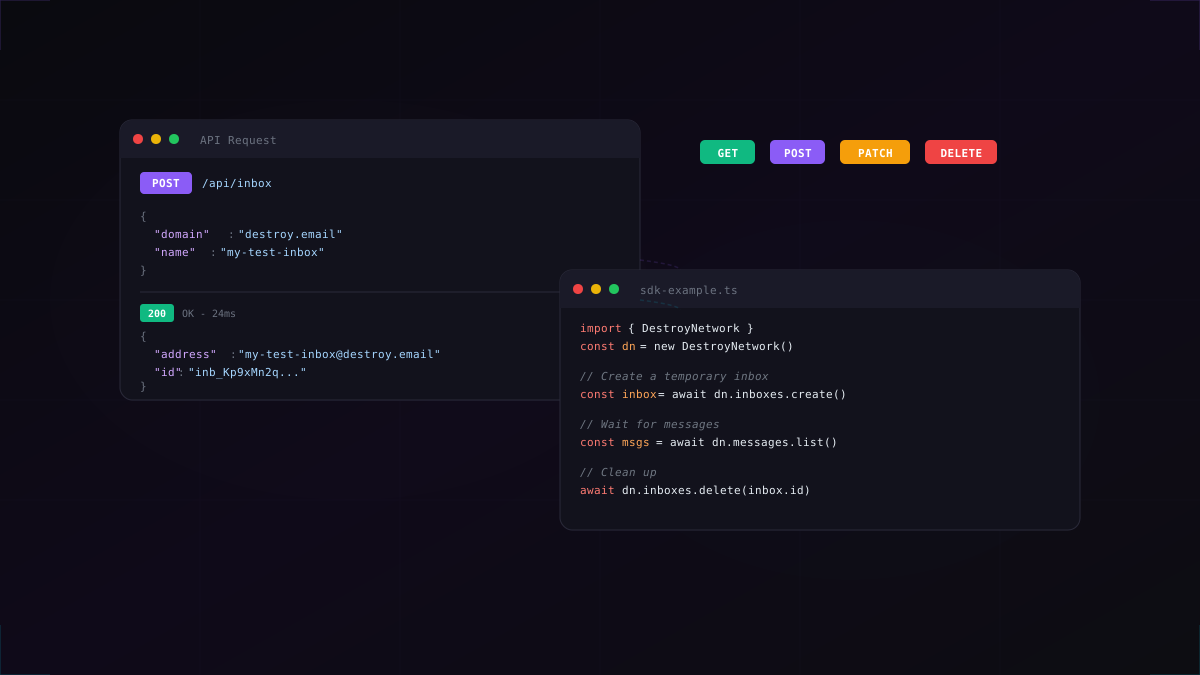
For automated testing and CI/CD pipelines, destroy.network provides a full-featured REST API (available on Pro and Business plans). Developers use it to:
- Test email verification flows in Playwright, Selenium, or Cypress
- Automate QA testing for transactional emails
- Create temporary inboxes programmatically for load testing
- Set up webhooks for real-time email notifications
Pro plans include 100 requests/minute, while Business gets 1,000 requests/minute with priority support. Read our guide on testing email flows with Playwright to see the API in action.
Built on Cloudflare for Privacy & Speed
destroy.network runs entirely on Cloudflare's edge network, meaning:
- Ultra-low latency: Inboxes are created within 100ms globally
- Privacy-first infrastructure: No permanent data storage-emails auto-delete when promised
- DDoS protection: Built-in protection against attacks and abuse
- Global edge network: Powered by Cloudflare's 300+ data centers worldwide for consistent low latency
Are Temporary Emails Safe?
The safety of disposable email depends on how you use it and which service you choose. Here's what you need to know:
What Temp Mail Protects Against
- Spam and marketing emails never reaching your real inbox
- Email tracking pixels that monitor when and where you open emails
- Long-term profiling by advertisers and data brokers
- Data breaches because the email auto-deletes before it can be stolen
What Temp Mail Doesn't Protect
- Anyone with the link: Disposable emails aren't password-protected. If someone gets your inbox URL, they can see your emails (until expiration)
- Public inbox services: Some older services use public inboxes where anyone can check any email. destroy.network uses private, unique URLs.
- Sensitive communications: Don't use temp mail for banking, medical records, or anything requiring long-term confidentiality
Choosing a Safe Temp Mail Service
When selecting a disposable email provider, look for:
- Private inboxes with unique URLs (not public shared inboxes)
- Guaranteed auto-deletion so your data doesn't linger
- HTTPS/TLS encryption for all connections
- No ads or trackers embedded in the service itself
- Transparent privacy policy about data handling
Frequently Asked Questions
Is it legal to use a disposable email address?
Yes, using disposable email is completely legal. It's a legitimate privacy tool, similar to using a VPN or private browsing mode. However, some services (like banking or government sites) prohibit temp mail in their terms of service and may block known disposable domains.
Can websites detect and block temp mail?
Some websites do block disposable email domains, especially financial services and high-value accounts. They maintain lists of known temp mail domains and reject signups from those addresses. However, many services don't block temp mail, and new disposable email domains constantly emerge faster than blocklists can update.
How long does a temporary email last?
It depends on the service and plan tier. destroy.network offers:
- Free: 10 minutes (extendable once by 10 minutes)
- Pro: 30 minutes with unlimited 30-minute extensions
- Business: 60 minutes with unlimited 60-minute extensions, plus name reservation for 45 days after expiry
Can I send emails from a disposable address?
Most disposable email services are receive-only to prevent spam abuse. If you need to send anonymous emails, consider a privacy-focused email service like ProtonMail or Tutanota instead.
Can I receive attachments in temp mail?
Yes, most modern temp mail services support attachments. destroy.networksupports attachments on all plans-up to 5MB on Free, 25MB on Pro, and 50MB on Business-stored securely on Cloudflare R2 and auto-deleted when the inbox expires.
What if I need to access the email later?
That's the tradeoff with disposable email-once it expires, it's gone forever. If you think you'll need the email later, either:
- Choose a longer expiration time (Pro/Business tiers)
- Forward important emails to your real address before expiration
- Use an email alias service (like SimpleLogin or AnonAddy) instead
What's the difference between disposable email and email aliases?
Email aliases forward emails to your real inbox and can be turned on/off but require setup. Disposable email is instant, requires no configuration, and auto-deletes everything. Use aliases for services you'll use long-term; use disposable email for one-time signups.
Get Started with Disposable Email
Ready to protect your inbox and reclaim your privacy? Creating your first temporary email takes less than 5 seconds:
- Visit destroy.network
- Click "Create Inbox" (no signup required)
- Get your temporary email address instantly
- Use it anywhere online
- Watch emails arrive in real-time
For developers, check out our API documentation to integrate disposable email into your testing workflows. And if you need longer-lasting inboxes or team collaboration, explore our Pro and Business plans.
The Future of Email Privacy
As online tracking becomes more sophisticated and data breaches more common, tools like disposable email are no longer just for tech-savvy users-they're essential for anyone who values privacy. By using temporary email addresses strategically, you can:
- Keep your real inbox clean and spam-free
- Prevent companies from building long-term profiles about you
- Minimize your exposure in data breaches
- Take control of who has access to your contact information
Start protecting your privacy today with destroy.network - the fastest, most private disposable email service built on Cloudflare's edge network.